Nokia is one of the major telecommunications companies in the world. It was among the first in mobile telephone production and is one of the undisputed leaders on the market today . This Finish company operates plants in 10 countries, it has branches in 45 different countries, and has over 36,000 employees around the world.
Different models of Nokia mobile telephones have been available to customers through the MAGTI GSM offices. We would like to introduce to you one of the most recent ones - Nokia 5110. It was launched in 1998 and shortly became one of the most popular mobile phones due to its practical features and reasonable price.
Apart from its main function as a telephone, Nokia 5110 has a calculator, games, a clock and an alarm. These can be used even when the mobile function is disconnected.
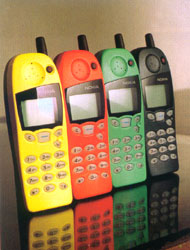
This telephone can store the numbers of the last ten calls, those made, received, or missed. Unlike the previous models, it also records the precise time of the calls. The menu can operate in 26 languages. You can also choose a ringing tone from 30 different options available. Nokia 5110 is especially attractive to young people since it has a removable black cover which can be changed to red, yellow, green and blue versions.
Let us have a look at some useful tips for Nokia 5110 users. Unlike other models, Nokia 5110 has very convenient shortcuts, so the user does not have to search in menus and sub-menus to get quickly to the needed function. The shortcuts are listed below:
FUNCTION
Last call duration
menu 351
Last ten received calls menu 32
Last ten missed calls
menu 31
Last ten dialled numbers menu 33 or é
Ringing volume
menu 93
Ringing tone
menu 92
Alarm clock
menu 81
Change clock setting menu
822
Clock on
menu 821
Clock off
menu 821
Games
menu 6
Calculator
menu 7
Speed dials
(you will need to activate
menu 4-1-2 first)
menu18
PIN code request
(you will need to enter
your PIN code)
menu 431
To carry your mobile in the pocket safely you will need to lock your keypad. For this press the central button and then press *. The same combination will unlock your keypad.
To QuickSave names and numbers in the Phone Book, enter the number, press é or ê to change the Navi Key text to SAVE. Then press the central button, enter the name, press the central button again – the phone will display “OK.”
To QuickFind the desired phone number in the Phone Book by name press ê and enter the first letter of the name or simply scroll with é or ê until the desired name appears on the screen.
To establish a better “rapport” between you and your Nokia 5110 we advise that you spend some time and read the accompanying User’s Guide. For more advice please visit us at MAGTI GSM service centres. We will be happy to answer all your questions.
Levan Buchukuri
Head of the Customer Service
and Marketing Department
MAGTI GSM